
Get Every Single Discord Badge on Your Discord Account: Complete Guide
Hey readers, In this blog guide article of GHOULx, we will discuss on How to Get Every Single Discord Badge on Your Discord Account in 2025. This guide article will completely guide you over the Discord Badges, How to get them, and whether they are achievable in 2025 or not. Discord badges are like trophies for your digital self. They’re tiny icons on your profile that scream, "Look at my achievements!" Whether you're a gamer, developer, or community enthusiast, collecting all Discord badges can set your profile apart. Let’s dive into how you can get every single badge Discord offers in 2025!
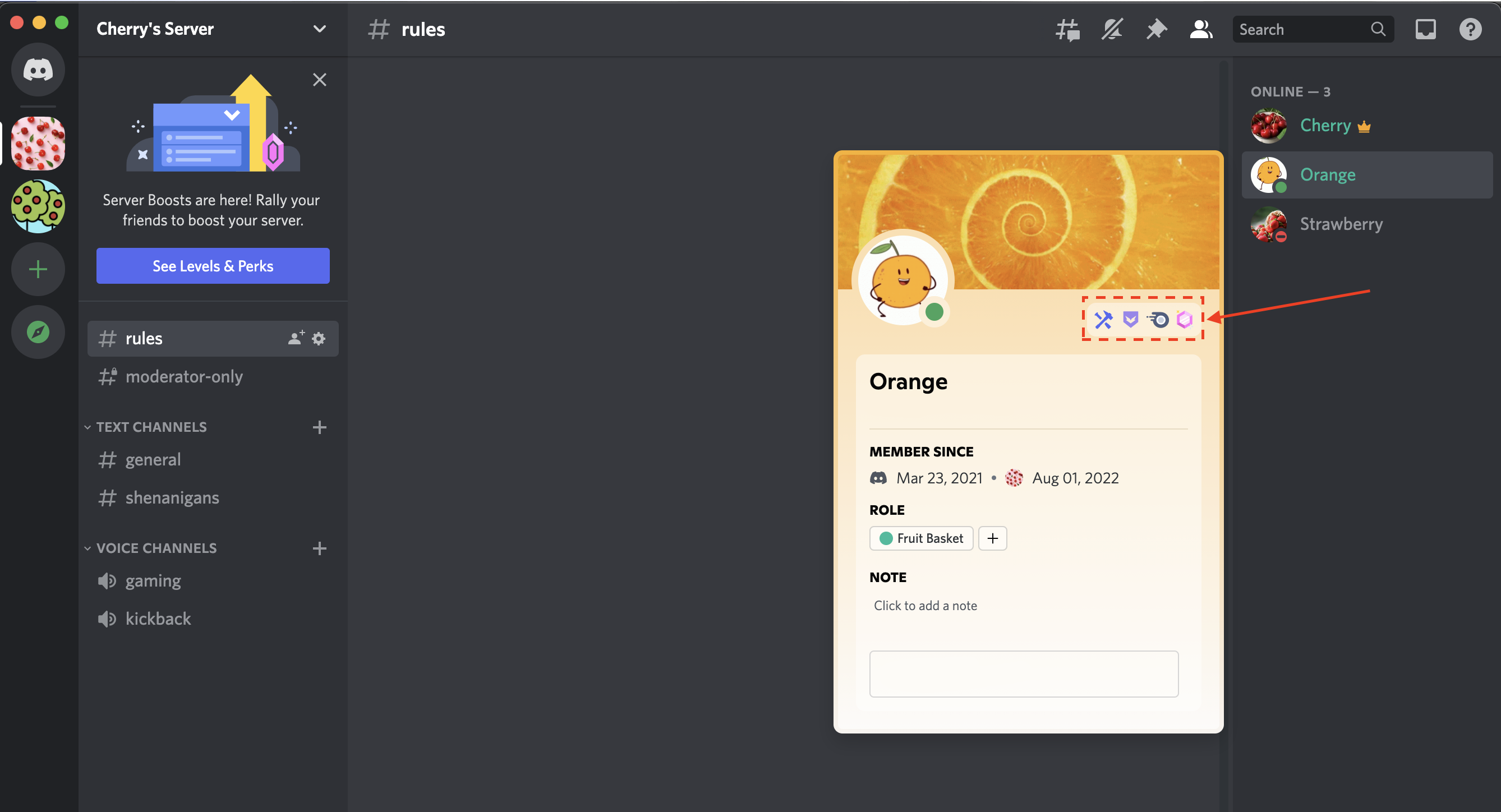




First, What are Discord Badges? and Why does Discord Badges even matter?
Discord badges are small, decorative icons that appear on user profiles. These icons represent various achievements, affiliations, or roles in the Discord community. Think of them as rewards for contributing, subscribing, or being an active participant.
Besides looking cool, badges show that you're more than just a casual user. They indicate your commitment to the community, your technical skills, or even your ability to sniff out bugs in the platform. Plus, they can make you stand out in servers with thousands of users.
Types of Discord Badges
Profile Badges & Server Badges
- Profile Badges: These badges are visible on your personal profile and travel with you across servers.
- Server Badges: These are exclusive to specific servers and don’t appear on your global profile.
Earnable Badges & Exclusive Badges
- Earnable Badges: These can be obtained through specific actions, like joining HypeSquad or becoming a Nitro subscriber.
- Exclusive Badges: These are reserved for legacy members or those who meet niche criteria, like the Early Supporter badge.
Step-by-Step Guide to Getting Discord Badges
1. HypeSquad Badges
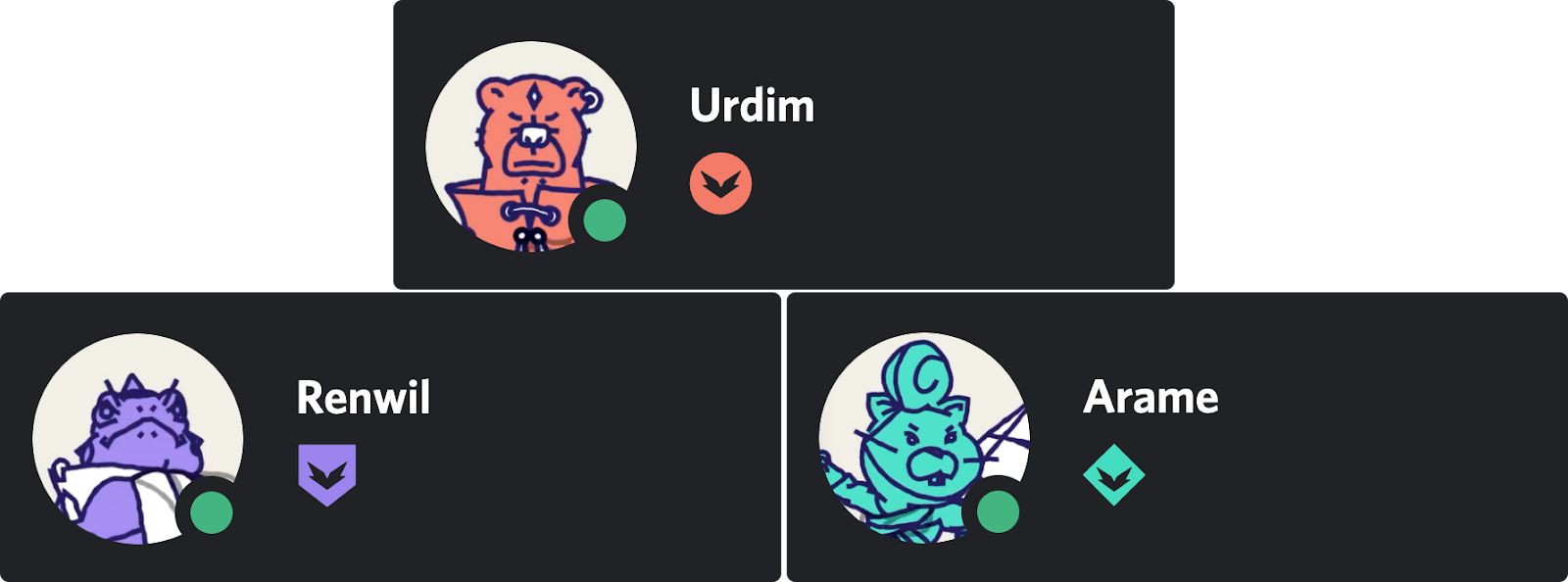
HypeSquad is Discord's community-driven program that lets you join a “house” (Bravery, Brilliance, or Balance) or participate in events as an ambassador. If you want to learn more about HypeSquad Badges, you can read the HypeSquad House Breakdown from Discord.
How to Join HypeSquad Events and Houses
- Head to User Settings > HypeSquad.
- Complete the short quiz to determine your house.
- After completing the short quiz, you will be assigned to the House of Bravery, the House of Brilliance, or the House of Balance. You can also click on your profile to take a look at your new HypeSquad House badge.
2. Discord Nitro Badge
Subscription Requirements
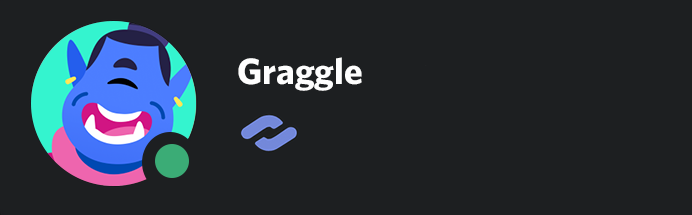
This badge is awarded to active Nitro subscribers. Discord Nitro offers perks like HD streaming, custom emojis, and enhanced profile customizations. Anyone subscribed to Nitro, Nitro Classic, or Nitro Basic will have the Discord Nitro badge reflected on their profile.By hovering over this badge, the subscription date will appear to let others know how long they’ve been subscribed. If you see other Discord users sending custom emojis and stickers, they are typically holders of the Discord Nitro Badge. Learn more about perks offered through Discord Nitro here.If you see other Discord users sending custom emojis and stickers, they are typically holders of the Discord Nitro Badge. Learn more about perks offered through Discord Nitro here.
How to Activate the Nitro Badge
- Subscribe to Discord Nitro through Settings > Subscriptions.
- Your badge automatically appears on your profile.
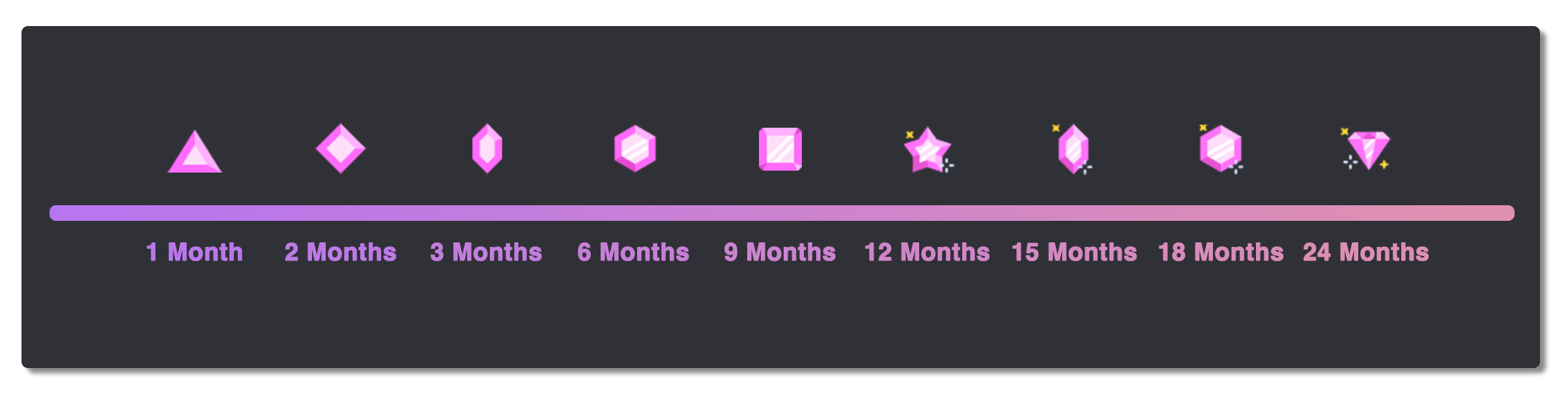
Server Boosting Badge: This pink badge represents a user who directly supports one of their favorite servers through Server Boosting. By hovering over the Server Booster badge, you’ll see how long they’ve boosted servers. If an individual continues server boosting without any pause, the badge will evolve and the design will change over time. but If you stop boosting servers, or you are no longer boosting any servers at any time, your boosting streak and badge will reset to the first level! If you have multiple boosted servers, the badge will always be whichever is your longest Server Boost streak (or the longest milestone of time achieved for your Server Boost).
3. Bug Hunter Badge
Bug Hunter badge is awarded to the most hard-working of those in the Bug Hunter community. There’s even a Golden Bug Hunter badge for those who reach the highest hunter level by going above and beyond! Those interested in earning this badge will have to actively participate in the Discord Testers community. You can learn more about Discord Testers Program and Bugs report here.
How to Become a Bug Hunter
- Join the Discord Testers Server.
- Report valid bugs through the designated channels.
Tips to Earn the Badge Quickly
- Focus on less-reported bugs for higher chances of validation.
- Engage actively in the tester community to build credibility.
4. Early Supporter Badge
Can You Still Get This Badge?
Unfortunately, this badge was for users who supported Discord before October 2018.
Before there were two styles of Discord Nitro, there was simply a $5 version of Nitro. After the $10 tier of Nitro was introduced, Discord granted the Early Supporter badge to anyone who supported Discord in the early years of Discord as a thank you gift! Anyone who purchased Nitro at any point before Wednesday, October 10th, 2018 received this badge. This badge can no longer be obtained!
5. Verified Bot Developer Badge
Building and Verifying Your Bot
- Create a functional bot using platforms like Node.js or Python. You can learn more about creating Discord Bots here.
- Submit your bot for verification under Developer Portal > My Applications.
Alternatives for Discord Developers
While this badge is now retired, developers can gain recognition through active bot contributions and server engagement.
Discord Partner Badge
Partner Program Requirements
To qualify, you need a well-managed server with consistent engagement and quality content. Discord prefers servers that foster positive communities. This badge is no longer obtainable.
Certified Moderator Badge
Long ago, Discord granted the Certified Discord Moderator badge to those who were part of their moderation programs. These individuals would receive this badge to show they've mastered the Moderator Academy courses and were active participants in Discord's moderator program ecosystem. The badge has since evolved into the Moderator Program Alumni badge, as a way to thank everyone that was a part of Discord moderator ecosystem before Thursday, December 1st, 2022. This badge can no longer be obtained!
Exclusive and Legacy Badges:
1. Early Verified Bot Developer Badge
This badge was awarded to developers who verified their bots before the program's retirement in 2020. It’s no longer available, making it a rare gem.
2. Legacy Bravery, Brilliance, and Balance Badges
These are retired HypeSquad house badges for users who participated before the redesign.
3. Event Participation Badges
Watch out for special Discord events in 2025, which may offer exclusive participation badges.
GHOULX x F9XR's Discord Server: A Haunting Hub for NFT & Crypto Promotion, Reaching 10,000 Strong!
 |
| Server Screenshot |
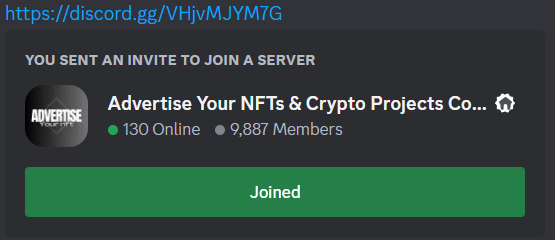
Calling all cryptonauts, NFT enthusiasts, and digital ghouls! A spectral storm is brewing in the Discord underworld, and it's centered around GHOULX x F9XR's "Advertise Your NFTs" server. This haven for all things undead and non-fungible is on the brink of a major milestone: 10,000 members!
But what exactly is GHOULX x F9XR, and why should you care about its growing legion of NFT & Crypto advocates? Let's delve into the crypt and unearth the secrets of this spooky social space.
Beyond the Graveyard Gates:
Imagine a digital catacombs bustling with creators, collectors, and everything in between. A place where your prized pixelated skulls and haunted landscapes can find their forever homes, or at least, a wider audience of potential admirers. That's GHOULX x F9XR in a nutshell.
This server isn't just about throwing your NFTs into the void and hoping for the best. It's a meticulously curated community with a focus on quality promotion and genuine engagement. Here, you'll find:
- Dedicated channels for specific NFT projects: Each project gets its own space to showcase its wares, share updates, and engage with potential buyers. No more wading through a chaotic sea of promotional posts.
- Regular events and contests: From art raffles and collector AMAs to spooky game nights and meme contests, there's always something fun and engaging happening in the GHOULX x F9XR crypt.
- A supportive and knowledgeable community: Whether you're a seasoned NFT pro or a curious newcomer, the server's ghoul squad is always ready to offer advice, answer questions, and celebrate your successes (and commiserate over your mints that went south).
Reaching 10,000 and Beyond:
As the server prepares to breach the 10,000-member mark, the excitement is palpable. This milestone signifies not just the server's growth, but also the increasing popularity of NFTs and the power of community-driven promotion.
What does this mean for you?
- Wider reach for your NFTs & Crypto Projects: With a larger audience comes more potential buyers and collectors for your spooky creations.
- Valuable networking opportunities: Connect with other artists, collectors, and influencers in the NFT space.
- Stay ahead of the curve: GHOULX x F9XR is a hub for all things NFT news and Crypto trends, so you'll always be in the know.
So, are you ready to join the ghoul gang? Head over to the GHOULX x F9XR Discord server and prepare to be spooked (in the best way possible) by the vibrant community, endless NFT goodness, and the eerie charm of this digital graveyard. Remember, 10,000 strong and counting, this server is just getting started!
Bonus Tip: To celebrate the 10,000 member mark, the GHOULX x F9XR team is planning a special event. Keep an eye on the server announcements for more details, and don't miss out on the festivities!
Our Crypto & NFT Project Shilling Discord Server is BOOMING!
— F9XR - TTEarnCrypto (@ttearncrypto) December 30, 2023
We're about to hit 10,000 members and it's only getting started. Join the community and be part of the future of crypto: https://t.co/RlbQ0bgmJM#Crypto #NFT #Shilling #Growth #Crypto #NFT #EarnCrypto #Shill #NFTs https://t.co/7EwFp5NGpd pic.twitter.com/5tHVg4dfpI
Celebrate with Discord: Festive Gear & Nitro Giveaway!

The giveaway is running from December 19th, 2023 to December 25th, 2023. To enter, you need to:
- Retweet the giveaway tweet
- Follow @discord on Twitter
- Tag a friend in the comments (optional)
There are three prize packs up for grabs, each containing:
- A limited edition Discord Nitro plush
- A Discord beanie
- A Discord water bottle
- A set of Discord stickers
The winners will be announced on December 26th, 2023.
Here are some additional details about the giveaway:
- You must be 13 years or older to enter.
- The giveaway is open to residents of the United States, Canada, the United Kingdom, France, Germany, Spain, Italy, and Brazil.
- For full terms and conditions, see the Discord Holiday Shop Giveaway 2023 Twitter post.
Good luck with entering the giveaway! I hope you win one of the awesome prize packs.
Here are some additional things you might be interested in:
- Other Discord giveaways: There are often other giveaways running on Discord, so be sure to check out the #giveaways channel on your favorite servers.
- Discord Nitro: Discord Nitro is a premium subscription service that gives you access to a variety of perks, such as custom emojis, animated avatars, and larger file upload limits. You can learn more about Discord Nitro here.
- The Discord blog: The Discord blog is a great place to stay up-to-date on the latest news and announcements from Discord. You can find the Discord blog here.
if u ever wanted to match discord profiles with your homies, now is your chance.
— Discord (@discord) December 21, 2023
tag a friend in the replies and we'll gift the winning duos their choice of items from the Shop.
my lawyers told me to put this here: https://t.co/ESiO5VZlzr pic.twitter.com/qvDEzcPgAs
Discord Pulls the Plug on AI Chatbot Clyde
Discord announced on Tuesday that it is shutting down its AI chatbot, Clyde, after less than a year of testing. The company said in a support note that Clyde will be "deactivated" at the end of this month, and that by December 1st, "users will no longer be able to invoke Clyde in DMs, Group DMs or server chats."
Clyde was first introduced back in March as an experimental feature. It was powered by OpenAI technology and was designed to be a helpful assistant that could answer questions, provide information, and even engage in conversations with users. However, it seems that Clyde didn't quite live up to expectations. In a blog post announcing the shutdown, Discord said that Clyde had "learned enough from its testing period" and that the company decided an AI chatbot was not a "good fit" for its service.
The shutdown of Clyde is a bit surprising, given that Discord seemed to be quite invested in the project. The company had been testing Clyde's AI features for months before it was officially launched, and it even went so far as to create a dedicated support page for the bot. However, it's possible that Discord simply decided that Clyde wasn't worth the resources it was taking up, or that the company is planning to focus on other AI projects.
Whatever the reason, it's clear that Discord is not interested in pursuing an AI chatbot at this time. The company said in its blog post that it is "always exploring new ways to improve Discord," and that it "may revisit the idea of an AI chatbot in the future." However, for now, Clyde is officially dead.
Discord could soon let you stream Xbox gameplay directly to servers & DMs

Discord announced on August 2, 2023 that users will now be able to stream Xbox gameplay directly from their console to the chat app. The new feature will be available via the Xbox Insider beta program right away, with a full release to follow.
To stream Xbox gameplay on Discord, you will need to:
- Connect your Discord account to your Xbox account.
- Open the Discord app on your Xbox console.
- Click on the Activity tab.
- Select the game that you want to stream.
- Click on the Stream button.
- Select the Discord server or DM that you want to stream to.
Once you have started streaming, your friends will be able to see your gameplay in real time. They will also be able to chat with you and interact with your gameplay.

The new Discord feature is a great way to share your Xbox gameplay with your friends and family. It is also a great way to collaborate with other players on games that support cross-platform play.
Here are some of the benefits of streaming Xbox gameplay on Discord:
- You can share your gameplay with your friends and family.
- You can collaborate with other players on games that support cross-platform play.
- You can use Discord's chat features to communicate with your viewers.
- You can build a following of viewers who are interested in your gameplay.
If you are an Xbox gamer, You can try out the new Discord feature. It is a great way to share your gameplay with others and build a community around your gaming.
Discord has been making big moves to connect with more gaming platforms, specifically Xbox. Starting with the Xbox Insider beta program, Discord users can now stream gameplay directly from their console to the chat app. The full release should be available soon.
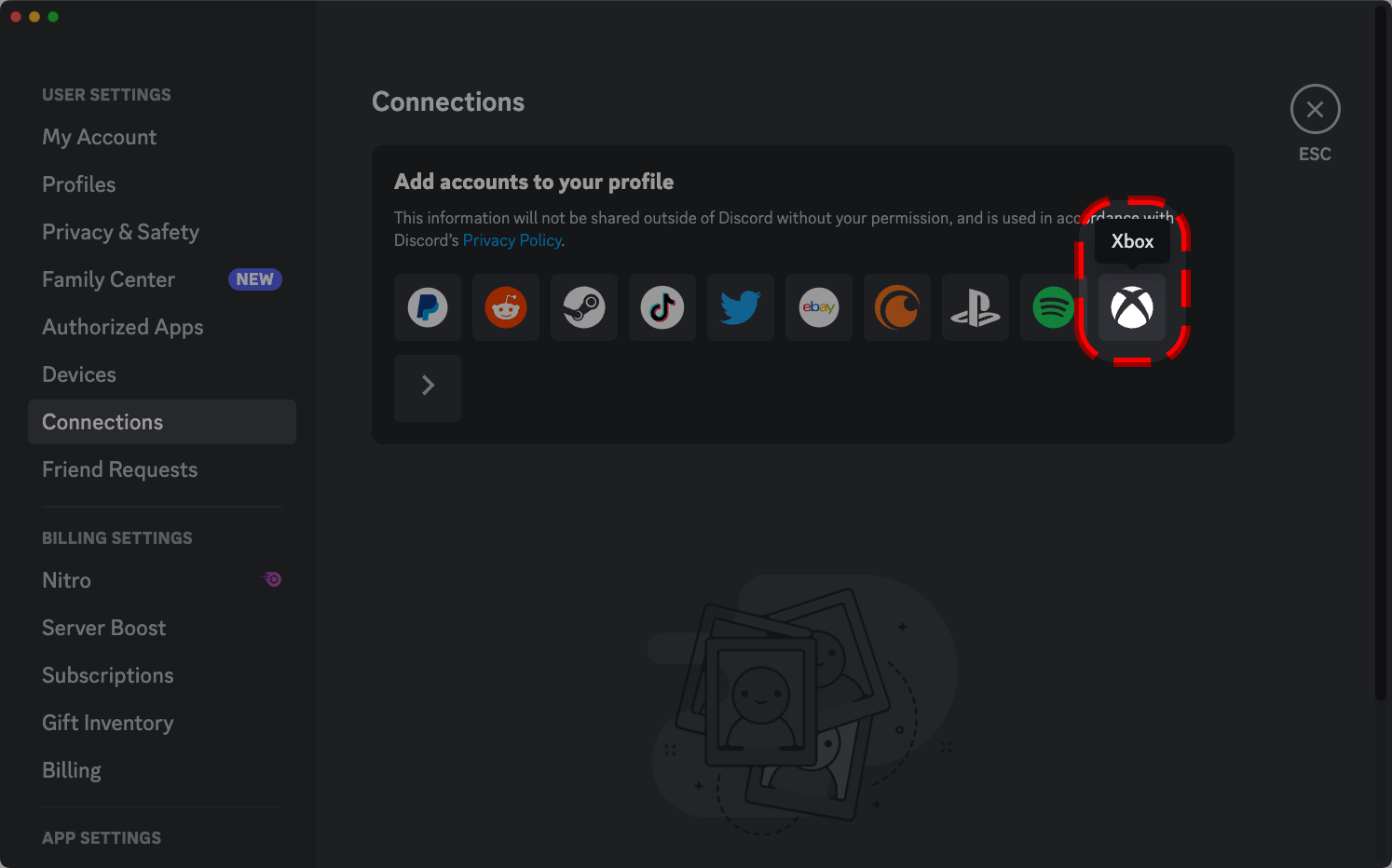
Here's how to connect Discord to Xbox:
- Download the Discord app from the Xbox Store.
- Open the Discord app on your Xbox console.
- Click on the Profile icon in the bottom right corner of the screen.
- Select Connections.
- Click on the Add button next to Xbox.
- Sign in to your Xbox account.
Once you have connected your Discord account to your Xbox account, you will be able to see your Xbox activity in Discord. You will also be able to stream your Xbox gameplay to Discord servers and DMs.
Here are some things to keep in mind when connecting Discord to Xbox:
- You must be running the latest version of the Discord app on your Xbox console.
- You must have an Xbox Insider account to stream gameplay in the beta program.
- The stream quality will depend on your internet connection.
Our most requested feature is becoming a reality: streaming games from your @Xbox directly to your friends on Discord.
— Discord (@discord) August 2, 2023
Playing games always feels better when you have your squad cheering you on. A subset of Xbox Insiders can stream to Discord starting today, with availability to… pic.twitter.com/Gz33yZsVyO
Discord or Telegram: Which one Should You Choose? - Simple Guide

Discord and Telegram are both popular messaging apps, but they have different strengths and weaknesses. Here are some reasons why you might choose Discord over Telegram:
- Better for gaming. Discord was originally designed for gamers, and it still has a lot of features that make it great for gaming communities. These features include voice chat, screen sharing, and integration with games.
- More customizable. Discord servers can be customized with different channels, roles, and permissions. This makes it easy to create a server that is tailored to your specific needs.
- More active community. Discord has a larger and more active community than Telegram. This means that there are more servers to join, and it is easier to find people to talk to.
- Better bot support. Discord has a large library of bots that can be used to automate tasks, provide information, and entertain users. This makes Discord a more powerful and versatile platform.
Of course, Telegram also has some advantages over Discord. For example, Telegram is more private, as it offers end-to-end encryption for all messages. Telegram is also more lightweight, making it a better choice for devices with limited resources.
Ultimately, the best choice for you will depend on your individual needs and preferences. If you are a gamer or if you want a more customizable and active community, then Discord is a good choice. If you are looking for a more private and lightweight messaging app, then Telegram is a better option.
Table that summarizes the key differences between Discord and Telegram:
| Feature | Discord | Telegram |
|---|---|---|
| Originally designed for | Gaming | General communication |
| Features | Voice chat, screen sharing, integration with games, customizable servers, bot support | End-to-end encryption for secret chats, file sharing up to 2GB, bots |
| Community | Large and active | Smaller and less active |
| Privacy | Not as private as Telegram | More private than Discord |
| Lightweight | No | Yes |
Most common complaints about Discord:
- User limits. Discord limits the number of users and channels that can be created on a server. This can be a problem for large communities or organizations that need to accommodate a lot of people.
- Video chat. The Discord video chat function is fairly basic and doesn't offer the perks or image quality of other, better known video calling apps.
- Integrations. Discord includes few native integrations. This means that you can't easily connect Discord with other apps or services.
- Memory space. Discord takes up a fair amount of RAM. This can be a problem for devices with limited resources.
- Safety in large servers. Discord is a social media site, which means it attracts its fair share of trolls and unethical users. This can be a problem for large servers, where it can be difficult to keep track of everyone who is participating.
Overall, Discord is a great chat app with a lot of features. However, it's important to be aware of its disadvantages before you decide to use it.
Some disadvantages of Discord:
- The app can be overwhelming for new users. There are a lot of features and options to learn about, and it can be difficult to find your way around at first.
- The app can be addictive. It's easy to get sucked into Discord, especially if you're part of a lot of active servers. This can lead to problems with productivity and social interaction.
- The app can be used for cyberbullying. Like any other social media platform, Discord can be used for cyberbullying. This is a serious problem, and it's important to be aware of it if you're using the app.
If you're considering using Discord, it's important to weigh the pros and cons carefully. The app has a lot to offer, but it's also important to be aware of its potential disadvantages.
Most common complaints about Telegram:
- Lack of moderation. Telegram has a reputation for being a haven for trolls and other unethical users. This is because the app does not have as much moderation as other messaging apps, such as WhatsApp.
- Privacy concerns. While Telegram offers end-to-end encryption for secret chats, it does not offer the same level of privacy for other types of chats. This means that your messages could be read by Telegram if they were to be compelled to do so by law enforcement.
- Security concerns. Telegram has been criticized for its security practices. For example, the app has been accused of storing user data on its servers, which could make it vulnerable to attack.
- Telegram Bots. Telegram bots can be used for a variety of purposes, but they can also be used to spread misinformation or spam. This can be a problem for users who are not careful about which bots they interact with.
Overall, Telegram is a secure and private messaging app with a number of features. However, it is important to be aware of its disadvantages before you decide to use it.
Common disadvantages of Telegram:
- The app can be difficult to use. The interface is not as user-friendly as some other messaging apps, and it can be difficult to find your way around at first.
- The app can be slow. Telegram can be slow to load, especially if you are using it on a slow internet connection.
- The app can be buggy. There have been reports of bugs in Telegram, which can cause problems with sending and receiving messages.
If you are considering using Telegram, it is important to weigh the pros and cons carefully. The app has a lot to offer, but it is also important to be aware of its potential disadvantages.
Know about Discord Timestamps & its Cheatsheet

What are Discord timestamps?
Discord timestamps are a way to include a date, time, or countdown in a Discord message. They are based on the Unix timestamp format, which counts the number of seconds since January 1st, 1970. When a timestamp is displayed in Discord, it will be updated in real time to reflect the user's local time zone.
How to create a Discord timestamp
There are two ways to create a Discord timestamp:
- Manually: You can manually create a timestamp by typing the Unix timestamp followed by the desired format. For example, to create a short date timestamp, you would type
<t:1658000000:d>. - Using a timestamp generator: There are many online timestamp generators that can help you create timestamps. These generators will usually allow you to choose the format of the timestamp and the time zone.
Different types of Discord timestamps
There are six different types of Discord timestamps:
- Short time: This format displays the time in 12-hour format, with AM or PM. For example,
<t:1658000000:t>would display as11:00 AM. - Long time: This format displays the time in 24-hour format, without AM or PM. For example,
<t:1658000000:T>would display as23:00. - Short date: This format displays the date in month/day/year format. For example,
<t:1658000000:d>would display as07/17/2023. - Long date: This format displays the date in month day, year format. For example,
<t:1658000000:D>would display asJuly 17, 2023. - Short date/time: This format displays the date and time in month/day/year time format. For example,
<t:1658000000:f>would display asJuly 17, 2023 11:00 AM. - Long date/time: This format displays the date and time in weekday, month day, year time format. For example,
<t:1658000000:F>would display asWednesday, July 17, 2023 11:00 AM.
Relative timestamps
Discord also supports relative timestamps, which are timestamps that display how much time has passed since a certain event. For example, if you wanted to create a timestamp that would display "in an hour", you would type <t:1658000000:R>.
How to change Discord timestamps
You can't change the format of the timestamps that are displayed in Discord. However, you can change your Discord time zone settings to change the way that timestamps are displayed in your local time zone.
Conclusion
Discord timestamps are a helpful way to include a date, time, or countdown in a Discord message. They are easy to create and can be displayed in a variety of formats. If you need to keep track of time in Discord, timestamps are a great way to do it.
Discord Timestamps Cheatsheet:
| Timestamp Type | Format | Example |
|---|---|---|
| Short time | t |
<t:1658000000:t> → 11:00 AM |
| Long time | T |
<t:1658000000:T> → 23:00 |
| Short date | d |
<t:1658000000:d> → 07/17/2023 |
| Long date | D |
<t:1658000000:D> → July 17, 2023 |
| Short date/time | f |
<t:1658000000:f> → July 17, 2023 11:00 AM |
| Long date/time | F |
<t:1658000000:F> → Wednesday, July 17, 2023 11:00 AM |
| Relative timestamp | R |
<t:1658000000:R> → in an hour |
Where to use Discord timestamps:
- In Discord messages
- In Discord bots
- In Discord settings
How to change Discord timestamps:
- You can't change the format of the timestamps that are displayed in Discord.
- You can change your Discord time zone settings to change the way that timestamps are displayed in your local time zone.
Best FREE Readymade Discord Server Rules Template: Copy Paste in Markdown & JSON for Embed
 |
| Normal Discord Server Rules |
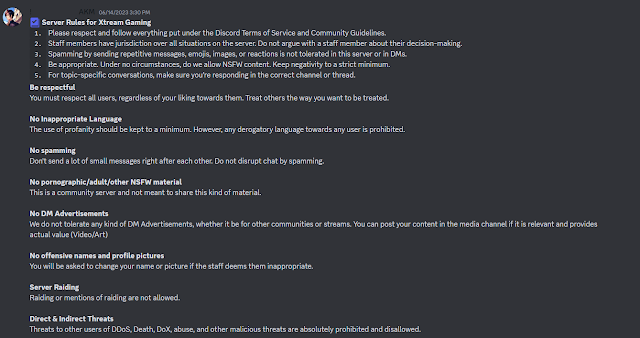
Discord Server Rules and Guidelines are a set of rules that govern how users behave on Discord servers. These rules are designed to create a safe and welcoming environment for everyone.
Some common Discord Server Rules and Guidelines include:
- No harassment, bullying, or hate speech. This includes any language or behavior that is intended to make someone feel uncomfortable or unsafe.
- No spam or trolling. This includes sending unwanted messages or links, or intentionally disrupting conversations.
- No sharing of illegal or harmful content. This includes child pornography, gore, or other content that could be considered harmful.
- No self-promotion. This includes posting links to your own content or services in inappropriate channels.
- Respect the privacy of others. This includes not sharing personal information without someone's consent.
In addition to these general rules, Discord servers may also have specific rules that are specific to their community. For example, a gaming server might have rules about not discussing spoilers for upcoming games, while a school server might have rules about not discussing schoolwork.
It is important to read and understand the Discord Server Rules and Guidelines for any server you join. By following these rules, you can help to create a safe and welcoming environment for everyone.
Here are some additional tips for making good Discord server rules:
- Be clear and concise.
- Be specific.
- Be consistent.
- Be fair.
- Be enforceable.
By following these tips, you can create a set of rules that will help to keep your Discord server running smoothly and prevent problems.
Here are some resources where you can learn more about Discord Server Rules and Guidelines:
- Discord Community Guidelines: https://discord.com/guidelines
- Discord Moderator Academy: https://discord.com/moderation
- Grow With Guidance - Discord Server Guidelines and Rules Template
- Grow with Guidance - NSFW Discord Server Guidelines and Rules Template/ Adult Discord Server
Discord Server Guidelines and Rules Template
Discord Server Rules and Guidelines templates are a set of pre-written rules that you can use as a starting point for creating your own rules. These templates can be a great way to save time and effort, and they can also help you to ensure that your rules are clear, concise, and comprehensive.
There are many different Discord Server Rules and Guidelines templates available online, so you can find one that is tailored to your specific needs. Here, We have listed our own TONTUF's Discord Server Rules and Guidelines from official Digital TONTUF' HQ Server. We have give you this template in three forms 1. Markdown Version, 2. Normal Version and 3. JSON Version for Embeds. We recommend you using Markdown Version as it is more clear and concise and looks far better than normal one. If you want you rules to be in a Embed then, we would recommend you using the JSON Version. All 3 Versions are listed below:
- Markdown Version
╔════╣ | 📌 **__Server Rules__ & __Guidelines__** | ╠════╗**:: By joining this Server, you agree to the Discord's Platform [Terms](https://discordapp.com/terms) & [Guidelines](https://discord.com/guidelines):: You understand that violating these Terms & our Rules, may result in a permanent ban from this Discord server.**`1.` **No NSFW in SFW channels.**```Please keep all content under 18+, no channel is NSFW unless specified.```────────────────────────────`2.` **Advertising & Self Promotion is NOT allowed.**```Do NOT ask people to join your server. Do NOT DM advertise to anyone. You will be banned.- You can DM any admin for promotions.- Don't mention servers names, this can cause warning!- Don't publish external server links, this causes deletion of you message and warning from staffs!```────────────────────────────`3.` **No Harassment or Discrimination**```Do not harass or bully people, this includes ethnicities, ages, genders, sexualities, and orientations. We do not allow discrimination, breaking this rule will result in a ban.```────────────────────────────`4.` **This is an English & Hindi only Server.**```Only speak English or Hindi in this server.```────────────────────────────`5.` **Reaching the Support.**```If you got an inquiry or issue(regarding TONTUF), please mention the role "Support" once, don't be annoying.- Don't contact the staffs privately to ask for help, the support server is not for a decoration.```────────────────────────────`6.` **Do not troll.**```If you are here to troll you will be Timeouted or Banned from this server.```────────────────────────────`7.` **Do not excessively ping people.**```Do not ping unless you have a legitimate reason. Never ping a user more than once per topic.- Don't mention the admins or developers, this bothers them.```────────────────────────────`8.` **Staff have the final say.**```Staff may enforce the rules based on their decision. If deemed necessary admins are allowed to ban if the situation requires it. Staff members are not limited to the rules, if deemed punish worthy the Staff may still punish even if it is not explicitly stated here in the rules.```────────────────────────────`9.` **No spam**```Spam is not allowed in any channel. Use the channels accordingly.```────────────────────────────``10.` **Do Not Mini Mod**```While we may appreciate you trying to help, mini modding creates more problems than solutions. This can result in a warn or mute.- You can ping 1 helper or DM 1 helper if there is a problem.```- **Use common sense as we cannot mention each & every rules here.**
- Normal Text Version
╔════╣ | Server Rules & Guidelines | ╠════╗:: By joining this Server, you agree to the Discord's Platform Terms & Guidelines.:: You understand that violating these Terms & our Rules, may result in a permanent ban from this Discord server.1. No NSFW in SFW channels.Please keep all content under 18+, no channel is NSFW unless specified.────────────────────────────2. Advertising & Self Promotion is NOT allowed.Do NOT ask people to join your server. Do NOT DM advertise to anyone. You will be banned.- You can DM any admin for promotions.- Don't mention servers names, this can cause warning!- Don't publish external server links, this causes deletion of you message and warning from staffs!────────────────────────────3. No Harassment or DiscriminationDo not harass or bully people, this includes ethnicities, ages, genders, sexualities, and orientations. We do not allow discrimination, breaking this rule will result in a ban.────────────────────────────4. This is an English & Hindi only Server.Only speak English or Hindi in this server.────────────────────────────5. Reaching the Support.If you got an inquiry or issue(regarding TONTUF), please mention the role "Support" once, don't be annoying.- Don't contact the staffs privately to ask for help, the support server is not for a decoration.────────────────────────────6. Do not troll.If you are here to troll you will be Timeouted or Banned from this server.────────────────────────────7. Do not excessively ping people.Do not ping unless you have a legitimate reason. Never ping a user more than once per topic.- Don't mention the admins or developers, this bothers them.────────────────────────────8. Staff have the final say.Staff may enforce the rules based on their decision. If deemed necessary admins are allowed to ban if the situation requires it. Staff members are not limited to the rules, if deemed punish worthy the Staff may still punish even if it is not explicitly stated here in the rules.────────────────────────────9. No spamSpam is not allowed in any channel. Use the channels accordingly.────────────────────────────`10. Do Not Mini ModWhile we may appreciate you trying to help, mini modding creates more problems than solutions. This can result in a warn or mute.- You can ping 1 helper or DM 1 helper if there is a problem.- Use common sense as we cannot mention each & every rules here.
- JSON Version for Embeds
{
"content": null,
"embeds": [
{
"title": "╔════╣ | 📌 **__Server Rules__ & __Guidelines__** | ╠════╗",
"description": "**:: By joining this Server, you agree to the Discord's Platform [Terms](https://discordapp.com/terms) & [Guidelines](https://discord.com/guidelines)\n:: You understand that violating these Terms & our Rules, may result in a permanent ban from this Discord server.**\n\n\n`1.` **No NSFW in SFW channels.**\n```Please keep all content under 18+, no channel is NSFW unless specified.\n\n```\n────────────────────────────\n`2.` **Advertising & Self Promotion is NOT allowed.**\n```Do NOT ask people to join your server. Do NOT DM advertise to anyone. You will be banned.\n- You can DM any admin for promotions. \n- Don't mention servers names, this can cause warning!\n- Don't publish external server links, this causes deletion of you message and warning from staffs!```\n\n\n────────────────────────────\n`3.` **No Harassment or Discrimination**\n```Do not harass or bully people, this includes ethnicities, ages, genders, sexualities, and orientations. We do not allow discrimination, breaking this rule will result in a ban.```\n\n\n────────────────────────────\n`4.` **This is an English & Hindi only Server.**\n```Only speak English or Hindi in this server.```\n\n\n────────────────────────────\n`5.` **Reaching the Support.**\n```If you got an inquiry or issue(regarding TONTUF), please mention the role \"Support\" once, don't be annoying.\n- Don't contact the staffs privately to ask for help, the support server is not for a decoration.```\n\n\n────────────────────────────\n`6.` **Do not troll.**\n```If you are here to troll you will be Timeouted or Banned from this server.```\n\n\n────────────────────────────\n`7.` **Do not excessively ping people.**\n```Do not ping unless you have a legitimate reason. Never ping a user more than once per topic.\n- Don't mention the admins or developers, this bothers them.```\n\n\n────────────────────────────\n`8.` **Staff have the final say.**\n```Staff may enforce the rules based on their decision. If deemed necessary admins are allowed to ban if the situation requires it. Staff members are not limited to the rules, if deemed punish worthy the Staff may still punish even if it is not explicitly stated here in the rules.```\n\n\n────────────────────────────\n`9.` **No spam**\n```Spam is not allowed in any channel. Use the channels accordingly.```\n\n\n────────────────────────────\n``10.` **Do Not Mini Mod**\n```While we may appreciate you trying to help, mini modding creates more problems than solutions. This can result in a warn or mute. \n- You can ping 1 helper or DM 1 helper if there is a problem.```\n\n\n- **Use common sense as we cannot mention each & every rules here.**",
"url": "https://ghoulx.blogspot.com/2023/07/best-free-readymade-discord-server.html",
"color": 2829616
}
],
"username": "TONTUF | Management Team",
"avatar_url": "https://cdn.discordapp.com/attachments/1088132914509783080/1097280538198421514/search-employee-5374228-4492206.png",
"attachments": []
}
Once you have chosen a template, you can customize it to fit your specific needs. You may need to add or remove rules, and you may also need to change the wording of some of the rules to make them more clear and concise.
Here are some tips for using Discord Server Rules and Guidelines templates:
- Read the template carefully before you start customizing it. This will help you to understand the purpose of each rule and how it fits into the overall template.
- Be clear about your goals for your Discord server. What kind of environment do you want to create? What behaviors do you want to encourage or discourage?
- Get feedback from other members of your community. Ask them what they think is important and what they would like to see included in the rules.
- Be willing to update your rules as needed. As your community grows and changes, your rules may need to be updated as well.
By following these tips, you can use Discord Server Rules and Guidelines templates to create a set of rules that are clear, concise, and effective.
Discord Server Rules and Guidelines are important for a number of reasons. They help to:
- Create a safe and welcoming environment for everyone. By having clear rules in place, Discord servers can help to prevent harassment, bullying, and other forms of abuse.
- Set expectations for behavior. When users know what is expected of them, they are more likely to behave in a way that is respectful and considerate of others.
- Resolve disputes. If a dispute arises between users, the Discord Server Rules and Guidelines can be used to help resolve the issue fairly.
- Protect the server from harmful content. By prohibiting the sharing of illegal or harmful content, Discord servers can help to protect their users and keep the server safe.
- Maintain the server's purpose. Discord servers are often created for specific purposes, such as gaming, discussion, or collaboration. By having clear rules in place, Discord servers can help to ensure that they are used for their intended purposes.
In short, Discord Server Rules and Guidelines are important for creating a positive and productive online experience for everyone. By following these rules, users can help to make Discord a safe and welcoming place for everyone.
Here are some additional benefits of having Discord Server Rules and Guidelines:
- They can help to reduce the workload of moderators. By having clear rules in place, moderators can focus on resolving more serious issues, rather than having to deal with minor infractions.
- They can help to build a sense of community. When users know what is expected of them, they are more likely to feel like they are part of a community. This can lead to increased engagement and participation.
- They can help to protect the server from legal liability. By having clear rules in place, Discord servers can help to reduce their risk of being held liable for the actions of their users.
If you are a Discord server owner or moderator, I encourage you to take the time to create and enforce clear rules. By doing so, you can help to create a positive and productive online experience for everyone.
Here are some tips on how to make your Discord Server Rules and Guidelines perfect and suitable for your Discord server:
- Start by brainstorming a list of potential rules. What are the most important things you want to communicate to your users? What behaviors do you want to discourage?
- Once you have a list of potential rules, review them carefully and make sure they are clear, concise, and specific. Avoid using vague language or terms that could be interpreted in different ways.
- Consider the purpose of your Discord server. What are you hoping to achieve by having rules in place? Once you know the purpose of your rules, you can tailor them to fit your specific needs.
- Get feedback from other members of your community. Ask them what they think is important and what they would like to see included in the rules.
- Once you have a final draft of your rules, make sure they are easy to find and accessible to all users. You may want to post them in a dedicated channel or include them in the server welcome message.
- Be prepared to enforce your rules. If a user breaks the rules, you need to be prepared to take action. This may involve warning the user, muting them, or even banning them from the server.
Here are some additional tips:
- Use plain language that is easy to understand. Avoid using legal jargon or technical terms that your users may not be familiar with.
- Be consistent in enforcing your rules. If you make an exception for one user, you will need to make an exception for all users.
- Be transparent about your rules. Make sure your users know what the rules are and how they will be enforced.
- Be willing to update your rules as needed. As your community grows and changes, your rules may need to be updated as well.
By following these tips, you can create a set of Discord Server Rules and Guidelines that are perfect and suitable for your Discord server.

Top Discord Shilling Servers: Promote and Discover the Best in NFTs and Crypto for FREE on Discord

Discord is a popular platform for gamers, socializing, and communities of all kinds. Among the many types of servers available, shilling servers have emerged as a popular way for users to advertise, promote, and discover new projects, particularly in the realm of NFTs and cryptocurrencies. In this article, we'll take a look at some of the top shilling servers on Discord, according to us, and explore what makes them stand out from the rest.

|
|
Join This Server | |

|
|
Join This Server | |
| Recommended |

|
|
Join This Server |


How to delete your bulk message from Discord for FREE
Discord is a powerful platform for communication and collaboration, but with great power comes great responsibility - including the responsibility to keep your channels clean and organized. Over time, messages can pile up, making it difficult to find important information or keep track of ongoing conversations. In this article, we'll show you how to delete bulk messages of your Discord account for FREE, so you can keep your digital footprint tidy and focused.
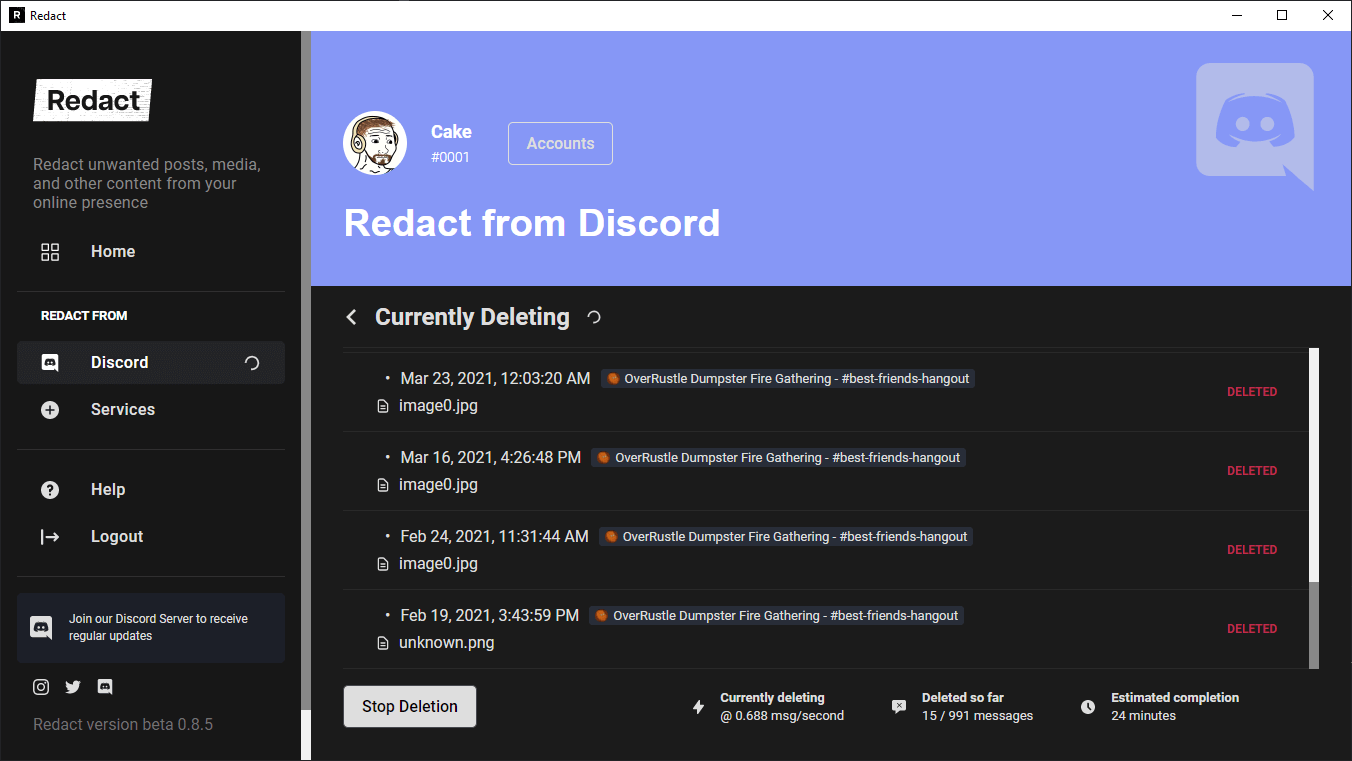
In order to Bulk delete your messages from Discord, we will need a tool named as Redact. Redact is a FREE Proprietary software tool that allows you to automatically clean up your old posts from services like Twitter, Reddit, Facebook, Discord and many other support social media platforms all in one place. It provides options to customize the deletion process, such as deleting by keyword, sentiment, content type, and more. You can also schedule deletions to occur at regular intervals, such as every 3 months, 6 months, or 1 year. Some of its features include:
- Mass deletion of messages, posts, direct messages, files, images, and more from over 20 websites and apps.
- Scheduled automatic bulk deletions.
- Smart deletion options such as deleting by keyword or content type.
- Support for over 40 services including Discord, Reddit, Twitter, Facebook, and more.
- Options to customize the deletion process to suit your needs.
Redact is completely free for personal use, For corporate use, you can contact Redact here for more details. But, Personal use plan can be great for users.
How to use it?
- Download and Install Redact
First, you need to make an account with Redact. We value your privacy just as much as you do, and therefore have made it impossible for anybody, including us, to see your account’s username, password, or any other information that may reveal your identity. After creating an account, you simply need to download the client at redact.dev/download, and install it like any other application.
- Connect your Discord account
Next, connect your Redact account to your Discord. This process is as simple as logging into your Discord profile inside our launcher. It is all very discreet, and you won’t have to worry about your friends seeing you use our application.
- Customize your settings as per your needs
Redact is a powerful and precise tool that gives you a tremendous amount of customization. You can select what server or DM you want to clear chats from, what timeframe you want gone, and even the specific kinds of messages you want to delete, such as image embeds or links. Using our preview tool, you can play around with all these settings and more until you find exactly the kinds of messages you want gone.
- Redact!
Finally, with the click of a single button, Redact will mass delete all your messages. They cannot be recovered or viewed by normal means, and will leave your record as spotless as if you never used Discord at all.


