-->
Know about Discord Timestamps & its Cheatsheet

Know about Discord Timestamps & its Cheatsheet

Know about Discord Timestamps & Cheatsheet

What are Discord timestamps?

Discord timestamps are a way to include a date, time, or countdown in a Discord message. They are based on the Unix timestamp format, which counts the number of seconds since January 1st, 1970. When a timestamp is displayed in Discord, it will be updated in real time to reflect the user's local time zone.

How to create a Discord timestamp

There are two ways to create a Discord timestamp:

  • Manually: You can manually create a timestamp by typing the Unix timestamp followed by the desired format. For example, to create a short date timestamp, you would type <t:1658000000:d>.
  • Using a timestamp generator: There are many online timestamp generators that can help you create timestamps. These generators will usually allow you to choose the format of the timestamp and the time zone.

Different types of Discord timestamps

There are six different types of Discord timestamps:

  • Short time: This format displays the time in 12-hour format, with AM or PM. For example, <t:1658000000:t> would display as 11:00 AM.
  • Long time: This format displays the time in 24-hour format, without AM or PM. For example, <t:1658000000:T> would display as 23:00.
  • Short date: This format displays the date in month/day/year format. For example, <t:1658000000:d> would display as 07/17/2023.
  • Long date: This format displays the date in month day, year format. For example, <t:1658000000:D> would display as July 17, 2023.
  • Short date/time: This format displays the date and time in month/day/year time format. For example, <t:1658000000:f> would display as July 17, 2023 11:00 AM.
  • Long date/time: This format displays the date and time in weekday, month day, year time format. For example, <t:1658000000:F> would display as Wednesday, July 17, 2023 11:00 AM.


Relative timestamps

Discord also supports relative timestamps, which are timestamps that display how much time has passed since a certain event. For example, if you wanted to create a timestamp that would display "in an hour", you would type <t:1658000000:R>.

How to change Discord timestamps

You can't change the format of the timestamps that are displayed in Discord. However, you can change your Discord time zone settings to change the way that timestamps are displayed in your local time zone.


Conclusion

Discord timestamps are a helpful way to include a date, time, or countdown in a Discord message. They are easy to create and can be displayed in a variety of formats. If you need to keep track of time in Discord, timestamps are a great way to do it.


Discord Timestamps Cheatsheet:

Timestamp Type Format Example
Short time t <t:1658000000:t>11:00 AM
Long time T <t:1658000000:T>23:00
Short date d <t:1658000000:d>07/17/2023
Long date D <t:1658000000:D>July 17, 2023
Short date/time f <t:1658000000:f>July 17, 2023 11:00 AM
Long date/time F <t:1658000000:F>Wednesday, July 17, 2023 11:00 AM
Relative timestamp R <t:1658000000:R>in an hour

Where to use Discord timestamps:

  • In Discord messages
  • In Discord bots
  • In Discord settings

How to change Discord timestamps:

  • You can't change the format of the timestamps that are displayed in Discord.
  • You can change your Discord time zone settings to change the way that timestamps are displayed in your local time zone.
Best FREE Readymade Discord Server Rules Template: Copy Paste in Markdown & JSON for Embed

Best FREE Readymade Discord Server Rules Template: Copy Paste in Markdown & JSON for Embed

Best FREE Readymade Discord Server Rules Template: Copy Paste in Markdown & JSON for Embed
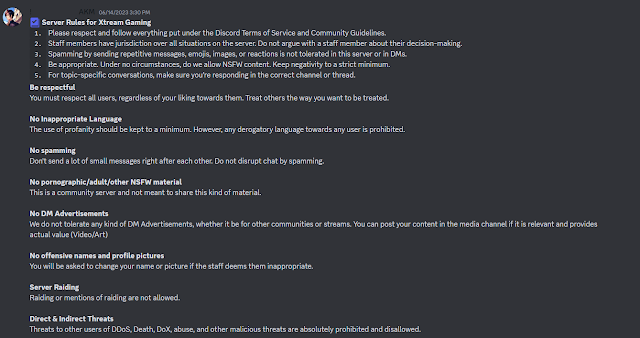
Normal Discord Server Rules


Discord Server Rules and Guidelines are a set of rules that govern how users behave on Discord servers. These rules are designed to create a safe and welcoming environment for everyone.

Some common Discord Server Rules and Guidelines include:

  • No harassment, bullying, or hate speech. This includes any language or behavior that is intended to make someone feel uncomfortable or unsafe.
  • No spam or trolling. This includes sending unwanted messages or links, or intentionally disrupting conversations.
  • No sharing of illegal or harmful content. This includes child pornography, gore, or other content that could be considered harmful.
  • No self-promotion. This includes posting links to your own content or services in inappropriate channels.
  • Respect the privacy of others. This includes not sharing personal information without someone's consent.

In addition to these general rules, Discord servers may also have specific rules that are specific to their community. For example, a gaming server might have rules about not discussing spoilers for upcoming games, while a school server might have rules about not discussing schoolwork.

It is important to read and understand the Discord Server Rules and Guidelines for any server you join. By following these rules, you can help to create a safe and welcoming environment for everyone.

Here are some additional tips for making good Discord server rules:

  • Be clear and concise.
  • Be specific.
  • Be consistent.
  • Be fair.
  • Be enforceable.

By following these tips, you can create a set of rules that will help to keep your Discord server running smoothly and prevent problems.

Here are some resources where you can learn more about Discord Server Rules and Guidelines:


Discord Server Guidelines and Rules Template

Discord Server Rules and Guidelines templates are a set of pre-written rules that you can use as a starting point for creating your own rules. These templates can be a great way to save time and effort, and they can also help you to ensure that your rules are clear, concise, and comprehensive.

There are many different Discord Server Rules and Guidelines templates available online, so you can find one that is tailored to your specific needs. Here, We have listed our own TONTUF's Discord Server Rules and Guidelines from official Digital TONTUF' HQ Server. We have give you this template in three forms 1. Markdown Version, 2. Normal Version and 3. JSON Version for Embeds. We recommend you using Markdown Version as it is more clear and concise and looks far better than normal one. If you want you rules to be in a Embed then, we would recommend you using the JSON Version. All 3 Versions are listed below:

  • Markdown Version 

╔════╣     | 📌 **__Server Rules__ & __Guidelines__**  |     ╠════╗

**:: By joining this Server, you agree to the Discord's Platform [Terms](https://discordapp.com/terms) & [Guidelines](https://discord.com/guidelines)
:: You understand that violating these Terms & our Rules, may result in a permanent ban from this Discord server.**


`1.` **No NSFW in SFW channels.**
```Please keep all content under 18+, no channel is NSFW unless specified.

```
────────────────────────────
`2.` **Advertising & Self Promotion is NOT allowed.**
```Do NOT ask people to join your server. Do NOT DM advertise to anyone. You will be banned.
- You can DM any admin for promotions. 
- Don't mention servers names, this can cause warning!
- Don't publish external server links, this causes deletion of you message and warning from staffs!```


────────────────────────────
`3.` **No Harassment or Discrimination**
```Do not harass or bully people, this includes ethnicities, ages, genders, sexualities, and orientations. We do not allow discrimination, breaking this rule will result in a ban.```


────────────────────────────
`4.` **This is an English & Hindi only Server.**
```Only speak English or Hindi in this server.```


────────────────────────────
`5.` **Reaching the Support.**
```If you got an inquiry or issue(regarding TONTUF), please mention the role "Support" once, don't be annoying.
- Don't contact the staffs privately to ask for help, the support server is not for a decoration.```


────────────────────────────
`6.` **Do not troll.**
```If you are here to troll you will be Timeouted or Banned from this server.```


────────────────────────────
`7.` **Do not excessively ping people.**
```Do not ping unless you have a legitimate reason. Never ping a user more than once per topic.
- Don't mention the admins or developers, this bothers them.```


────────────────────────────
`8.` **Staff have the final say.**
```Staff may enforce the rules based on their decision. If deemed necessary admins are allowed to ban if the situation requires it. Staff members are not limited to the rules, if deemed punish worthy the Staff may still punish even if it is not explicitly stated here in the rules.```


────────────────────────────
`9.` **No spam**
```Spam is not allowed in any channel. Use the channels accordingly.```


────────────────────────────
``10.` **Do Not Mini Mod**
```While we may appreciate you trying to help, mini modding creates more problems than solutions. This can result in a warn or mute. 
- You can ping 1 helper or DM 1 helper if there is a problem.```


- **Use common sense as we cannot mention each & every rules here.**


  • Normal Text Version

╔════╣     |  Server Rules & Guidelines  |     ╠════╗
:: By joining this Server, you agree to the Discord's Platform Terms & Guidelines.
:: You understand that violating these Terms & our Rules, may result in a permanent ban from this Discord server.


1. No NSFW in SFW channels.
Please keep all content under 18+, no channel is NSFW unless specified.

────────────────────────────
2. Advertising & Self Promotion is NOT allowed.
Do NOT ask people to join your server. Do NOT DM advertise to anyone. You will be banned.
- You can DM any admin for promotions. 
- Don't mention servers names, this can cause warning!
- Don't publish external server links, this causes deletion of you message and warning from staffs!


────────────────────────────
3. No Harassment or Discrimination
Do not harass or bully people, this includes ethnicities, ages, genders, sexualities, and orientations. We do not allow discrimination, breaking this rule will result in a ban.


────────────────────────────
4. This is an English & Hindi only Server.
Only speak English or Hindi in this server.


────────────────────────────
5. Reaching the Support.
If you got an inquiry or issue(regarding TONTUF), please mention the role "Support" once, don't be annoying.
- Don't contact the staffs privately to ask for help, the support server is not for a decoration.


────────────────────────────
6. Do not troll.
If you are here to troll you will be Timeouted or Banned from this server.


────────────────────────────
7. Do not excessively ping people.
Do not ping unless you have a legitimate reason. Never ping a user more than once per topic.
- Don't mention the admins or developers, this bothers them.


────────────────────────────
8. Staff have the final say.
Staff may enforce the rules based on their decision. If deemed necessary admins are allowed to ban if the situation requires it. Staff members are not limited to the rules, if deemed punish worthy the Staff may still punish even if it is not explicitly stated here in the rules.


────────────────────────────
9. No spam
Spam is not allowed in any channel. Use the channels accordingly.


────────────────────────────
`10. Do Not Mini Mod
While we may appreciate you trying to help, mini modding creates more problems than solutions. This can result in a warn or mute. 
- You can ping 1 helper or DM 1 helper if there is a problem.


- Use common sense as we cannot mention each & every rules here.


  • JSON Version for Embeds

{

  "content": null,

  "embeds": [

    {

      "title": "╔════╣     | 📌 **__Server Rules__ & __Guidelines__**  |     ╠════╗",

      "description": "**:: By joining this Server, you agree to the Discord's Platform [Terms](https://discordapp.com/terms) & [Guidelines](https://discord.com/guidelines)\n:: You understand that violating these Terms & our Rules, may result in a permanent ban from this Discord server.**\n\n\n`1.` **No NSFW in SFW channels.**\n```Please keep all content under 18+, no channel is NSFW unless specified.\n\n```\n────────────────────────────\n`2.` **Advertising & Self Promotion is NOT allowed.**\n```Do NOT ask people to join your server. Do NOT DM advertise to anyone. You will be banned.\n- You can DM any admin for promotions. \n- Don't mention servers names, this can cause warning!\n- Don't publish external server links, this causes deletion of you message and warning from staffs!```\n\n\n────────────────────────────\n`3.` **No Harassment or Discrimination**\n```Do not harass or bully people, this includes ethnicities, ages, genders, sexualities, and orientations. We do not allow discrimination, breaking this rule will result in a ban.```\n\n\n────────────────────────────\n`4.` **This is an English & Hindi only Server.**\n```Only speak English or Hindi in this server.```\n\n\n────────────────────────────\n`5.` **Reaching the Support.**\n```If you got an inquiry or issue(regarding TONTUF), please mention the role \"Support\" once, don't be annoying.\n- Don't contact the staffs privately to ask for help, the support server is not for a decoration.```\n\n\n────────────────────────────\n`6.` **Do not troll.**\n```If you are here to troll you will be Timeouted or Banned from this server.```\n\n\n────────────────────────────\n`7.` **Do not excessively ping people.**\n```Do not ping unless you have a legitimate reason. Never ping a user more than once per topic.\n- Don't mention the admins or developers, this bothers them.```\n\n\n────────────────────────────\n`8.` **Staff have the final say.**\n```Staff may enforce the rules based on their decision. If deemed necessary admins are allowed to ban if the situation requires it. Staff members are not limited to the rules, if deemed punish worthy the Staff may still punish even if it is not explicitly stated here in the rules.```\n\n\n────────────────────────────\n`9.` **No spam**\n```Spam is not allowed in any channel. Use the channels accordingly.```\n\n\n────────────────────────────\n``10.` **Do Not Mini Mod**\n```While we may appreciate you trying to help, mini modding creates more problems than solutions. This can result in a warn or mute. \n- You can ping 1 helper or DM 1 helper if there is a problem.```\n\n\n- **Use common sense as we cannot mention each & every rules here.**",

      "url": "https://ghoulx.blogspot.com/2023/07/best-free-readymade-discord-server.html",

      "color": 2829616

    }

  ],

  "username": "TONTUF | Management Team",

  "avatar_url": "https://cdn.discordapp.com/attachments/1088132914509783080/1097280538198421514/search-employee-5374228-4492206.png",

  "attachments": []

}


Once you have chosen a template, you can customize it to fit your specific needs. You may need to add or remove rules, and you may also need to change the wording of some of the rules to make them more clear and concise.

Here are some tips for using Discord Server Rules and Guidelines templates:

  • Read the template carefully before you start customizing it. This will help you to understand the purpose of each rule and how it fits into the overall template.
  • Be clear about your goals for your Discord server. What kind of environment do you want to create? What behaviors do you want to encourage or discourage?
  • Get feedback from other members of your community. Ask them what they think is important and what they would like to see included in the rules.
  • Be willing to update your rules as needed. As your community grows and changes, your rules may need to be updated as well.

By following these tips, you can use Discord Server Rules and Guidelines templates to create a set of rules that are clear, concise, and effective.


Discord Server Rules and Guidelines are important for a number of reasons. They help to:

  • Create a safe and welcoming environment for everyone. By having clear rules in place, Discord servers can help to prevent harassment, bullying, and other forms of abuse.
  • Set expectations for behavior. When users know what is expected of them, they are more likely to behave in a way that is respectful and considerate of others.
  • Resolve disputes. If a dispute arises between users, the Discord Server Rules and Guidelines can be used to help resolve the issue fairly.
  • Protect the server from harmful content. By prohibiting the sharing of illegal or harmful content, Discord servers can help to protect their users and keep the server safe.
  • Maintain the server's purpose. Discord servers are often created for specific purposes, such as gaming, discussion, or collaboration. By having clear rules in place, Discord servers can help to ensure that they are used for their intended purposes.

In short, Discord Server Rules and Guidelines are important for creating a positive and productive online experience for everyone. By following these rules, users can help to make Discord a safe and welcoming place for everyone.

Here are some additional benefits of having Discord Server Rules and Guidelines:

  • They can help to reduce the workload of moderators. By having clear rules in place, moderators can focus on resolving more serious issues, rather than having to deal with minor infractions.
  • They can help to build a sense of community. When users know what is expected of them, they are more likely to feel like they are part of a community. This can lead to increased engagement and participation.
  • They can help to protect the server from legal liability. By having clear rules in place, Discord servers can help to reduce their risk of being held liable for the actions of their users.

If you are a Discord server owner or moderator, I encourage you to take the time to create and enforce clear rules. By doing so, you can help to create a positive and productive online experience for everyone.

Here are some tips on how to make your Discord Server Rules and Guidelines perfect and suitable for your Discord server:

  1. Start by brainstorming a list of potential rules. What are the most important things you want to communicate to your users? What behaviors do you want to discourage?
  2. Once you have a list of potential rules, review them carefully and make sure they are clear, concise, and specific. Avoid using vague language or terms that could be interpreted in different ways.
  3. Consider the purpose of your Discord server. What are you hoping to achieve by having rules in place? Once you know the purpose of your rules, you can tailor them to fit your specific needs.
  4. Get feedback from other members of your community. Ask them what they think is important and what they would like to see included in the rules.
  5. Once you have a final draft of your rules, make sure they are easy to find and accessible to all users. You may want to post them in a dedicated channel or include them in the server welcome message.
  6. Be prepared to enforce your rules. If a user breaks the rules, you need to be prepared to take action. This may involve warning the user, muting them, or even banning them from the server.

Here are some additional tips:

  • Use plain language that is easy to understand. Avoid using legal jargon or technical terms that your users may not be familiar with.
  • Be consistent in enforcing your rules. If you make an exception for one user, you will need to make an exception for all users.
  • Be transparent about your rules. Make sure your users know what the rules are and how they will be enforced.
  • Be willing to update your rules as needed. As your community grows and changes, your rules may need to be updated as well.

By following these tips, you can create a set of Discord Server Rules and Guidelines that are perfect and suitable for your Discord server.

Top Discord Shilling Servers: Promote and Discover the Best in NFTs and Crypto for FREE on Discord

Top Discord Shilling Servers: Promote and Discover the Best in NFTs and Crypto for FREE on Discord

Top Discord Shilling Servers: Promote and Discover the Best in NFTs and Crypto for FREE on Disccord

Discord is a popular platform for gamers, socializing, and communities of all kinds. Among the many types of servers available, shilling servers have emerged as a popular way for users to advertise, promote, and discover new projects, particularly in the realm of NFTs and cryptocurrencies. In this article, we'll take a look at some of the top shilling servers on Discord, according to us, and explore what makes them stand out from the rest.


GHOULX: Advertising Community
Join This Server
GHOULX: ShareHub
Join This Server
Recommended
Advertise Your NFTs & Crypto Projects
Join This Server


NFTs World
Join This Server
NFTverse
Join This Server
NFT🔥Drop Central
Join This Server
OpenSea
Join This Server
🎉 NFT Shilling 🎉
Join This Server
ViceVersa
Join This Server
Shillzoneá´´á´°
Join This Server
How to delete your bulk message from Discord for FREE

How to delete your bulk message from Discord for FREE

Discord is a powerful platform for communication and collaboration, but with great power comes great responsibility - including the responsibility to keep your channels clean and organized. Over time, messages can pile up, making it difficult to find important information or keep track of ongoing conversations. In this article, we'll show you how to delete bulk messages of your Discord account for FREE, so you can keep your digital footprint tidy and focused.

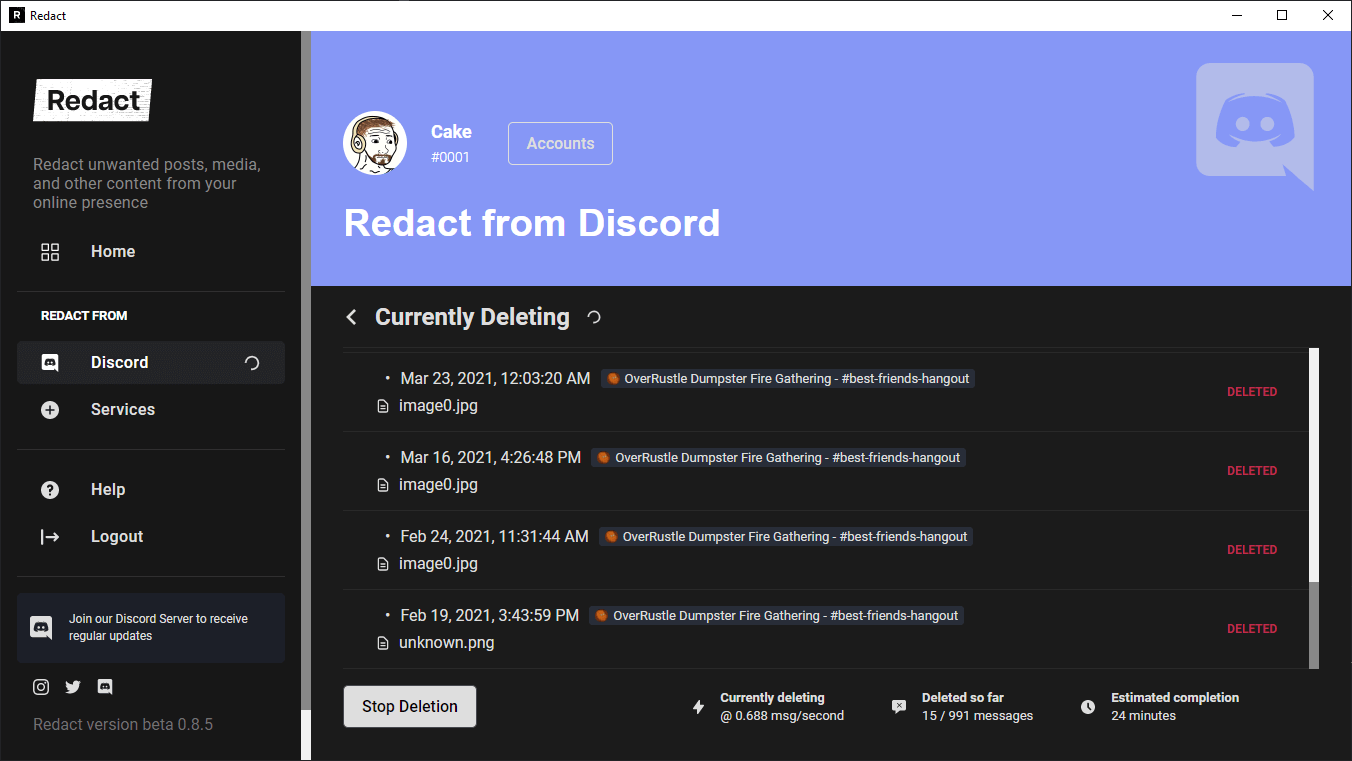
In order to Bulk delete your messages from Discord, we will need a tool named as Redact. Redact is a FREE Proprietary software tool that allows you to automatically clean up your old posts from services like Twitter, Reddit, Facebook, Discord and many other support social media platforms all in one place. It provides options to customize the deletion process, such as deleting by keyword, sentiment, content type, and more. You can also schedule deletions to occur at regular intervals, such as every 3 months, 6 months, or 1 year. Some of its features include:
  • Mass deletion of messages, posts, direct messages, files, images, and more from over 20 websites and apps.
  • Scheduled automatic bulk deletions.
  • Smart deletion options such as deleting by keyword or content type.
  • Support for over 40 services including Discord, Reddit, Twitter, Facebook, and more.
  • Options to customize the deletion process to suit your needs.


How to delete your bulk message from Discord for FREE

Redact is completely free for personal use, For corporate use, you can contact Redact here for more details. But, Personal use plan can be great for users. 

How to use it?
  • Download and Install Redact
First, you need to make an account with Redact. We value your privacy just as much as you do, and therefore have made it impossible for anybody, including us, to see your account’s username, password, or any other information that may reveal your identity. After creating an account, you simply need to download the client at redact.dev/download, and install it like any other application.
  • Connect your Discord account
Next, connect your Redact account to your Discord. This process is as simple as logging into your Discord profile inside our launcher. It is all very discreet, and you won’t have to worry about your friends seeing you use our application.
  • Customize your settings as per your needs
Redact is a powerful and precise tool that gives you a tremendous amount of customization. You can select what server or DM you want to clear chats from, what timeframe you want gone, and even the specific kinds of messages you want to delete, such as image embeds or links. Using our preview tool, you can play around with all these settings and more until you find exactly the kinds of messages you want gone.
  • Redact!
Finally, with the click of a single button, Redact will mass delete all your messages. They cannot be recovered or viewed by normal means, and will leave your record as spotless as if you never used Discord at all.
Beyond Discord: The Best Alternative Platforms for Gamers and Teams

Beyond Discord: The Best Alternative Platforms for Gamers and Teams

Beyond Discord: The Best Alternative Platforms for Gamers and Teams

Are you looking for alternatives to Discord? Look no further! In this article, we will explore the top best alternatives to Discord. From Guilded to Element, there are plenty of options available for group chat and video calling. So, whether you’re a gamer or just looking for a new communication app, read on to discover the best alternatives to Discord on the Internet.

  • Guilded

Guilded is a VoIP, instant messaging, and digital distribution platform designed by Guilded Inc. and owned by Roblox Corporation. It is based in San Francisco and is a direct competitor to Discord.

Guilded primarily focuses on video game communities, such as those focused on competitive gaming and esports. It provides features intended for video gaming clans, such as scheduling tools and integrated calendars.

Users communicate with voice calls, video calls, text messaging, media, and files in private chats or as part of communities called "Guilds". The app has a similar user interface to Discord but offers more features such as 10 channel types.

Guilded is a direct competitor to Discord and is considered an alternative to the platform. Guilded primarily focuses on video game communities, such as those focused on competitive gaming and esports. It provides features intended for video gaming clans, such as scheduling tools and integrated calendars. The app has a similar user interface to Discord but offers more features such as 10 channel types.

  • Revolt Chat

Revolt is an open-source user-first chat platform designed by Revolt Inc. It is based in Europe and is considered an alternative to Discord.

Revolt lets you create a private space for you and your friends to chat, without any of the distractions of other chat apps. You can customize your server however you want, and even invite any other friends to join you. It is built even for the most dedicated communities.

Revolt focuses only on the user, and you can be sure that your conversations are confidential and your data is secure. It offers end-to-end data encryption to all of its users.

Revolt is an open-source user-first chat platform that is considered an alternative to Discord. It lets you create a private space for you and your friends to chat, without any of the distractions of other chat apps. You can customize your server however you want, and even invite any other friends to join you. It is built even for the most dedicated communities and focuses only on the user, ensuring that your conversations are confidential and your data is secure. 

  • FaceBook Groups

A Facebook Group is a page that any Facebook user can create that others can join, allowing group members to interact based on a common interest, affiliation, or association. It is a place for group communication, letting people share their common interests and express their opinions. Groups let people come together around a common cause, issue, or activity to organize, express objectives, discuss issues, post photos, and share related content.

Facebook groups may be open to anyone or joined by invitation only. A Facebook group allows members to create a community by promoting, sharing, and discussing common topics.

While Facebook Group and Discord both allow for group communication and the sharing of common interests, they serve different purposes and have different features. Facebook Group is a page that any Facebook user can create that others can join, allowing group members to interact based on a common interest, affiliation, or association. It is a place for group communication, letting people share their common interests and express their opinions. Groups let people come together around a common cause, issue, or activity to organize, express objectives, discuss issues, post photos, and share related content.

On the other hand, Discord is primarily focused on video game communities and provides features intended for video gaming clans, such as scheduling tools and integrated calendars. Discord also offers voice and video calls, screen sharing, and other features that are not available on Facebook Group.

In summary, while Facebook Group can be used as an alternative to Discord for group communication and sharing of common interests, it does not offer the same features and functionality as Discord. 

  • Twitter Communities

Twitter Communities are private channels where users can connect and engage with others who share their interests. Tweets in Communities are visible to anyone, but only members can participate in the discussion. Communities are started and managed by people on Twitter, who set the rules and moderate the conversations. Communities can be invite-only or open for anyone to join. Twitter Communities is a pilot program that is currently in beta.

Communities were created to give people a dedicated place to connect, share, and get closer to the discussions they care about most. With Communities, you can be your authentic self and have deeper, more meaningful conversations with people who get you.

While Twitter Communities and Discord both allow for group communication and the sharing of common interests, they serve different purposes and have different features. Twitter Communities are private channels where users can connect and engage with others who share their interests. Tweets in Communities are visible to anyone, but only members can participate in the discussion. Communities are started and managed by people on Twitter, who set the rules and moderate the conversations.

On the other hand, Discord is primarily focused on video game communities and provides features intended for video gaming clans, such as scheduling tools and integrated calendars. Discord also offers voice and video calls, screen sharing, and other features that are not available on Twitter Communities.

In summary, while Twitter Communities can be used as an alternative to Discord for group communication and sharing of common interests, it does not offer the same features and functionality as Discord. 

  • Slack

Slack is a messaging app for business that connects people to the information they need. By bringing people together to work as one unified team, Slack transforms the way organizations communicate. Slack helps you work in a more connected, flexible, and inclusive way.

Slack is designed for professional and organizational communications but has also been adopted as a community platform. It empowers everyone with no-code automation and AI, makes search and knowledge sharing seamless, and keeps teams connected and engaged.

At the heart of Slack are channels: organized spaces for everyone and everything you need for work. In channels, it’s easier to connect across departments, offices, time zones, and even other companies.

Slack is considered an alternative to Discord. While both platforms allow for group communication and the sharing of common interests, they serve different purposes and have different features. Slack is a messaging app for business that connects people to the information they need. By bringing people together to work as one unified team, Slack transforms the way organizations communicate. Slack helps you work in a more connected, flexible, and inclusive way.

On the other hand, Discord is primarily focused on video game communities and provides features intended for video gaming clans, such as scheduling tools and integrated calendars. Discord also offers voice and video calls, screen sharing, and other features that are not available on Slack.

In summary, while Slack can be used as an alternative to Discord for group communication and sharing of common interests, it does not offer the same features and functionality as Discord. 

  • Tox

Tox is a peer-to-peer instant-messaging and video-calling protocol that offers end-to-end encryption. The stated goal of the project is to provide secure yet easily accessible communication for everyone.

Tox is easy-to-use software that connects you with friends and family without anyone else listening in. While other big-name services require you to pay for features, Tox is completely free and comes without advertising — forever.

Tox is considered an alternative to Discord. While both platforms allow for group communication and the sharing of common interests, they serve different purposes and have different features. Tox is a peer-to-peer instant-messaging and video-calling protocol that offers end-to-end encryption. The stated goal of the project is to provide secure yet easily accessible communication for everyone.

On the other hand, Discord is primarily focused on video game communities and provides features intended for video gaming clans, such as scheduling tools and integrated calendars. Discord also offers voice and video calls, screen sharing, and other features that are not available on Tox.

In summary, while Tox can be used as an alternative to Discord for group communication and sharing of common interests, it does not offer the same features and functionality as Discord. 

  • Mattermost

Mattermost is an open-source, self-hostable online chat service with file sharing, search, and integrations. It is designed as an internal chat for organizations and companies and mostly markets itself as an open-source alternative to Slack and Microsoft Teams.

Mattermost provides extreme flexibility. You can run your own server installation on Windows, Mac, or Linux. Users can access the app securely through a desktop or mobile app, although it also runs in a browser window.

Mattermost is considered an alternative to Discord. While both platforms allow for group communication and the sharing of common interests, they serve different purposes and have different features. Mattermost is an open-source, self-hostable online chat service with file sharing, search, and integrations. It is designed as an internal chat for organizations and companies and mostly markets itself as an open-source alternative to Slack and Microsoft Teams.

On the other hand, Discord is primarily focused on video game communities and provides features intended for video gaming clans, such as scheduling tools and integrated calendars. Discord also offers voice and video calls, screen sharing, and other features that are not available on Mattermost.

In summary, while Mattermost can be used as an alternative to Discord for group communication and sharing of common interests, it does not offer the same features and functionality as Discord. 

  • RipCord

Ripcord is a desktop chat client for group-centric services like Slack and Discord. It provides a traditional compact desktop interface designed for power users. It's not built on top of web browser technology: it has a small resource footprint, responds quickly to input, and gets out of your way. 

Ripcord is an alternative desktop chat client for Discord. It provides a traditional compact desktop interface designed for power users. 

  • Threads

Threads is a Slack replacement designed for makers. It provides a simple, focused canvas for sharing your work and getting rich feedback in return. Threads is an all-in-one communication platform designed to avoid constant interruptions, the pain of keeping up/catching up, and encourage motion over progress as your company scales.

Threads is not a direct alternative to Discord. It is designed as a replacement for Slack, which is a team communication and collaboration platform. Discord, on the other hand, is primarily a voice, video, and text communication platform for gamers. However, both Slack and Discord can be used for similar purposes such as team communication and collaboration.

Important Discord Official Links at ONE place

Important Discord Official Links at ONE place

Important Discord Official Links at ONE place
Discord is a popular communication platform that has taken the world by storm. With its easy-to-use interface and powerful features, it's no wonder that millions of people use it every day to connect with friends, family, and communities. However, with so much information available, it can be challenging to find the official links you need to get the most out of Discord. That's why we've put together this handy guide to all the important Discord official links in one place.

SUPPORT & REPORTING:

OTHER Discord LINKS:

OFFICIAL Discord SERVERS:
In summary, Discord is a powerful communication platform that offers a wealth of features and tools to help you connect with others. With so much information available, it can be difficult to find the official links you need to make the most of your Discord experience. That's why we've created this comprehensive guide to all the important Discord official links in one place. We hope this guide has provided you with the information you need to fully enjoy Discord. So go ahead and explore the world of Discord with confidence, knowing that you have all the resources you need at your fingertips! 
2 Ways to Hide Link under your message on Discord: Complete Guide

2 Ways to Hide Link under your message on Discord: Complete Guide

2 Ways to Hide Link under your message on Discord: Complete Guide

Markdown Method:
Discord is a popular platform for communication among gamers, communities, and teams. One useful feature of Discord is the ability to hide links under your messages, making them more visually appealing and organized. In this article, we will guide you through the process of hiding a link under your message on Discord using Markdown formatting.

  • Step 1: Understand Markdown Formatting
Markdown is a lightweight markup language that allows you to format text in a simple and readable way. Discord supports Markdown, making it easy to hide links under your messages.
  • Step 2: Format the Text
To hide a link under your message, you need to use a specific format. Start by surrounding the text you want to display with square brackets `[ ]`. This will be the visible text that users see. 
  • Step 3: Add the Link
After the closing square bracket, immediately put the URL you want to link to in parentheses `( )`. This will be the destination of the link.
  • Step 4: Combine the Text and Link
Now, combine the formatted text and the link. Place the visible text inside the square brackets and the URL inside the parentheses. For example, if you want to hide a link to a website called "Example" with the URL "https://www.example.com", you would use the following format:

`[Example](https://www.example.com)`

  • Step 5: Send the Message
Once you have formatted the text and added the link, send the message on Discord. The text you specified will be displayed, and clicking on it will open the specified URL.

Conclusion:
Hiding a link under your message on Discord using Markdown formatting is a simple and effective way to make your messages more organized and visually appealing. By following the steps outlined in this article, you can easily hide links and provide a seamless user experience for your Discord community.


Simple Text Method:
After having a look on the Markdown method, we will now head over to Simple Text Method, this exits because the Markdown method can only be used in Embeds of Discord. However, you can use this method in normal chat as well. 

  • Step 1: Format the Text
To hide a link under your message, you need to use a specific format as show in the below image:
2 Ways to Hide Link under your message on Discord: Complete Guide

[Your message] ||​||||​||||​||||​||||​||||​||||​||||​||||​||||​||||​||||​||||​||||​||||​||||​||||​||||​||||​||||​||||​||||​||||​||||​||||​||||​||||​||||​||||​||||​||||​||||​||||​||||​||||​||||​||||​||||​||||​||||​||||​||||​||||​||||​||||​||||​||||​||||​||||​||||​||||​||||​||||​||||​||||​||||​||||​||||​||||​||||​||||​||||​||||​||||​||||​||||​||||​||||​||||​||||​||||​||||​||||​||||​||||​||||​||||​||||​||||​||||​||||​||||​||||​||||​||||​||||​||||​||||​||||​||||​||||​||||​||||​||||​||||​||||​||||​||||​||||​||||​||||​||||​||||​||||​||||​||||​||||​||||​||||​||||​||||​||||​||||​||||​||||​||||​||||​||||​||||​||||​||||​||||​||||​||||​||||​||||​||||​||||​||||​||||​||||​||||​||||​||||​||||​||||​||||​||||​||||​||||​||||​||||​||||​||||​||||​||||​||||​||||​||||​||||​||||​||||​||||​||||​||||​||||​||||​||||​||||​||||​||||​||||​||||​||||​||||​||||​||||​||||​||||​||||​||||​||||​||||​||||​||||​||||​||||​||||​||||​||||​||||​||||​||||​||||​||||​||||​||||​||||​||||​||||​||||​||||​||||​||||​||||​||||​||||​||||​||||​||||​||||​||||​||||​||||​||||​||||​||||​||||​||||​||||​||||​||||​||||​||||​||||​||||​||||​||||​||||​||||​||||​||||​||||​||||​||||​||||​||||​||||​||||​||||​||||​||||​||||​||||​||||​||||​||||​||||​||||​||||​||||​||||​||||​||||​||||​||||​||||​||||​||||​||||​|| [Your Link]

Write Your message / text in place of "[Your message]" and replace the "[Your Link]" with your owner link, you can see the DEMO image below. 

Preview:
2 Ways to Hide Link under your message on Discord: Complete Guide

  • For example, 
2 Ways to Hide Link under your message on Discord: Complete Guide

will look like:

2 Ways to Hide Link under your message on Discord: Complete Guide